Tips
How to Leave a WhatsApp Group Without Unnecessary Notifications
Aug 23, 2026 · Editorial Team
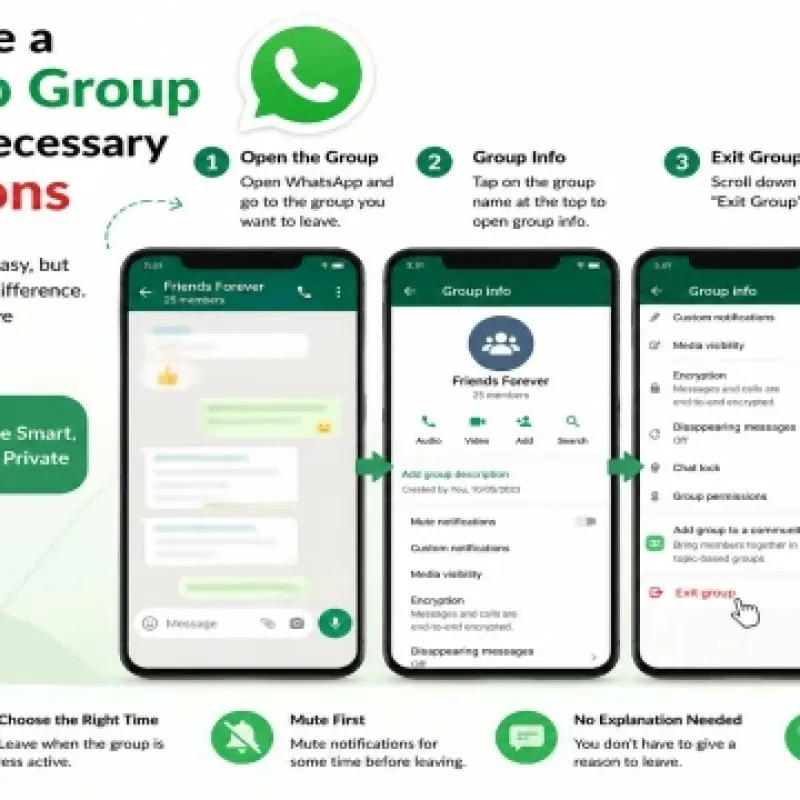
Leaving a group should be ordinary, not dramatic. People stay in dead or stressful chats because they do not want a “left” line to appear. WhatsApp’s exact labels change over time, but the ideas stay stable: mute first, exit when you are done, and tidy leftover messages so they stop pulling you back.
Mute when you are still evaluating
If you joined from a directory listing and you are not sure yet, mute the group. You remain a member, so you can scroll history later, but the phone stops buzzing. This is the right move for a 24-hour trial, not for a group you already know is harmful. Harmful chats should be exited, not muted.
Exit when the group is not for you
Open the group info and choose the leave or exit option WhatsApp provides. You may see a message in the group that you left. You cannot fully control how WhatsApp announces that to remaining members. If you need to avoid a confrontation, mute, stop posting, and exit at a quiet hour. Do not send a long goodbye; it often restarts the discussion you wanted to end.
Clear the leftover thread
After you leave, the chat may remain in your list until you archive or delete it on your device. Deleting the chat on your phone does not delete other people’s copies. It only cleans your list. Archive is useful if you might need a phone number from an old study group and do not want it on the main screen.
Notifications that continue after you think you left
Sometimes a community or linked announcement channel still pings you. Check remaining memberships. Also check whether someone added you to a new group with a similar name. If you keep getting added without consent, tighten who can add you in WhatsApp privacy settings where that control exists, and be careful which public invites you accept.
Admin view: when members leave in waves
If you run the group and people are leaving after a public listing, the invite may be attracting the wrong audience. Reset the link, shorten the description, and review the category you chose on the directory. A jobs group listed as entertainment will collect the wrong joiners.
Conclusion
Mute to evaluate, exit to stop the noise, then archive or delete the empty thread. You do not owe a public explanation. For joining the next group more carefully, use the interest-first method.
FAQ
Can GroupsFull remove me from a WhatsApp group?No. Only WhatsApp membership controls can do that. This website only stores directory listings.
Will people see that I left?Often yes. Assume the remaining members can see an exit event, then leave anyway if the group is not useful.
Tags: Group Management WhatsApp Groups